Block Craft 3D: Planet Craft
- 4.1
- Rating
- 50.00M
- Installs
- Free
- Price
 Analysis by App-foxy
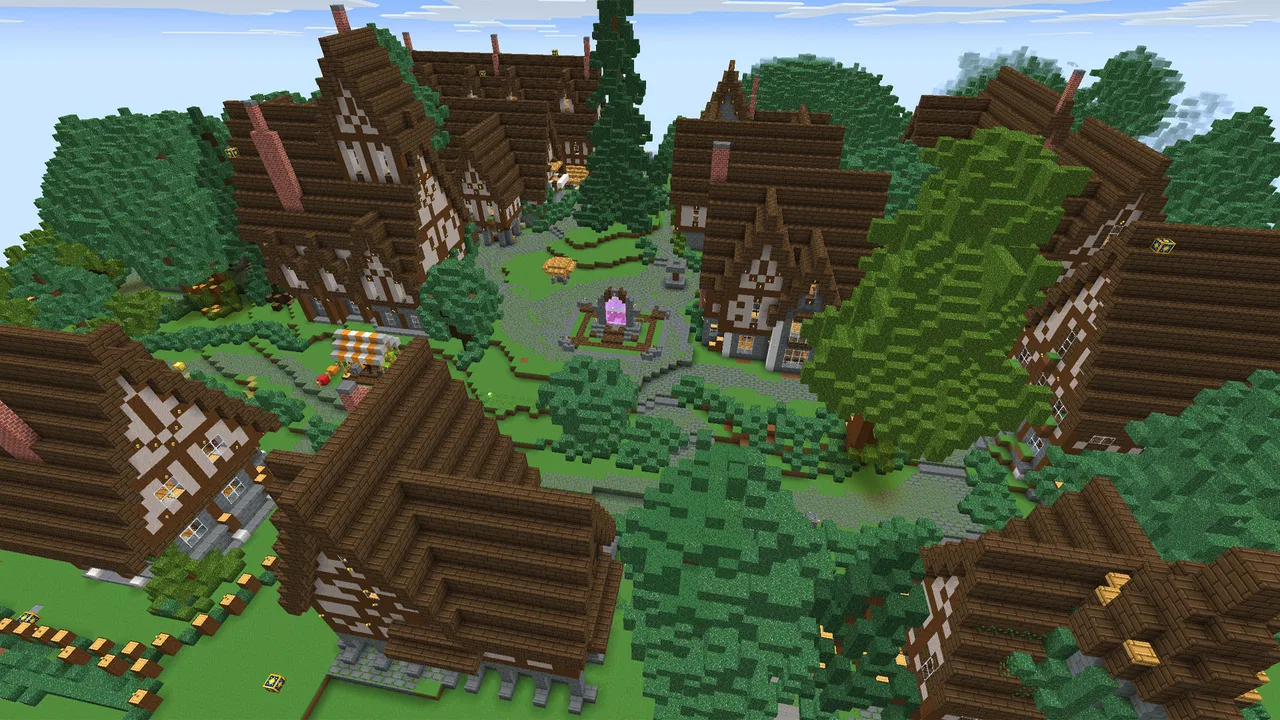
I spent time with Block Craft 3D: Planet Craft as a casual adventure game, and my first impression was that it is much more approachable than the name might suggest. It gives you a block-building world to explore and shape, but it does not demand the same commitment as a large, complicated survival sandbox. That makes it easy to pick up for a few minutes, especially when I want to build something without preparing for a long session.
The game comes from Playlabs LLC and is free to install. Its Everyone age rating also makes it a reasonable option for families looking for a creative mobile game, although I would still supervise younger players around optional purchases. The current version is 6.4.1, and it runs on Android 6.0 or later, so it is available to many older devices as well as newer phones and tablets.
How the free model affects the experience
The most important cost detail is simple: the game can be downloaded and played without an upfront payment. That matters because the main appeal is experimentation. I can open it, try building, decide that the idea is not for me, and leave without having paid for access. For a family or a player who is only curious about block-based games, that free entry point is useful.
You May Also Like

 AccuWeather: Weather Radar
AccuWeather Review: A Quick, Clear Forecast for Everyday Decisions
For everyday plans, the best forecast is the one you can understand quickly. AccuWeather makes rain timing, radar, and local conditions easy to act on, with a few trade-offs.

 Hill Climb Racing
Why Hill Climb Racing Still Turns Crashes Into One More Run
A tiny car, a bumpy hill and one more upgrade: Hill Climb Racing keeps resurfacing because its simple chaos makes every near-miss feel personal.

 AliExpress - Shopping App
AliExpress Makes Global Shopping Feel Personal, but Shoppers Bear the Risk
AliExpress turns a global marketplace into a pocket-sized discovery engine. Its reach is useful, its shopping loop compelling, and its trade-offs easy to miss.

 Lords Mobile: Kingdom Wars
Lords Mobile Is a Kingdom-Building Routine, Not a Quick Match
A case-by-case verdict on the building, battles, device demands, and social commitments that make Lords Mobile rewarding for some players and exhausting for others.

 PDF Scanner app - TapScanner
TapScanner Makes Paperwork Easier to Capture, Check, and Share
TapScanner makes scanning with a phone feel less like a rescue operation and more like a dependable step in getting work done. Its capture tools are useful, though not flawless.

 Block Blast!
 Shows How Much a Puzzle Game Can Leave Out
A quiet grid game shows why puzzle players increasingly value instant clarity, repeatable skill and low-pressure play—and where the genre still needs to catch up.
More From Our News Desk
View All News


There are optional in-app purchases ranging from $0.99 to $99.99 per item. I would treat that range as a reason to set purchase controls before handing the device to a child. The free access gives the game a low-risk starting point, but it does not mean every possible convenience or item is included at no cost. The practical question is whether the basic building loop is entertaining enough before spending anything.
I would not approach this as a game that needs a purchase to prove its value. Try the free version first, learn how the building and exploration feel on your device, and only then decide whether an optional purchase improves your own routine. That is a better test than assuming a larger purchase will fix a game that does not match your preferred pace.
What I actually did with the building loop
My most enjoyable sessions started with a small target rather than an ambitious city. I chose a simple structure, worked out its outline, and then adjusted the shape as the world developed around it. That approach made the game feel less like a checklist and more like a sketchbook. A small house, a lookout point, or a recognizable landmark is enough to create momentum.
The block format also makes mistakes easy to understand. If a wall looks too heavy or a roof feels out of place, the problem is visible immediately. I found that useful for younger players because the result is visual rather than hidden behind complicated menus. It also gives experienced sandbox players a quick way to test proportions before committing to a larger design.
One practical tip is to build in stages. I first marked the footprint, then raised the main shape, and only afterward added decorative details. Starting with decoration can make a project look busy while leaving its basic structure awkward. This staged method saves time and makes it easier to abandon a weak idea without feeling that a whole session was wasted.
Why the adventure setting matters
Although construction is the obvious attraction, the adventure category changes how I use the game. I am not simply working in an empty editor. Exploring gives the building activity a sense of place, and returning to a project after looking around can suggest a better location or a different style. That connection between wandering and creating is what keeps the experience from feeling like a static design tool.
For me, the strongest use case is a short creative break. I might have a few minutes while waiting for an appointment, open the game, add a room or reshape a path, and stop when the idea feels complete. It is also suitable for a longer relaxed session when I want to focus on visual construction rather than fast reactions or a demanding story.
A useful workflow is to explore before building anything large. I can get a feel for the surroundings, choose a spot that fits the project, and avoid spending time on a design that feels disconnected from its environment. This is a small habit, but it makes the world feel more intentional and reduces the urge to rebuild everything later.
Where it sits beside familiar alternatives
Players who usually choose Minecraft-style survival games may find this version more immediately accessible, but also less satisfying if they want a deep survival routine. A traditional survival-focused alternative is better for people who enjoy managing danger, resources, progression, and long-term objectives. Here, I would choose the game when the priority is building and casual exploration rather than a demanding survival challenge.
It also differs from a pure creative editor. An editor can be more precise and efficient when the only goal is designing a structure. This game adds the appeal of moving through a block world, so it is a better fit when discovery is part of the fun. The trade-off is that players seeking professional-level control or highly exact construction tools may prefer a more specialized building experience.
Compared with a fast action adventure, the pace is calmer and the reward comes from shaping the environment. That makes it a poor choice for someone who wants constant combat, rapid missions, or a tightly directed story. I would recommend it to the player who enjoys making a place feel personal, not to someone searching for nonstop intensity.
Small decisions that make sessions better
I found three habits especially helpful. First, I keep early projects compact. A finished small build feels more rewarding than an enormous unfinished plan, and it gives me a clear reason to return. Second, I use repeated shapes carefully. Repetition can make a building look organized, but too much of it can make the result dull, so I vary entrances, roof lines, or surrounding paths instead of changing every block.
Third, I treat the environment as part of the design. A structure does not have to stand alone. A path leading toward it, a change in height, or a small surrounding area can make a simple building feel more complete. This is where the adventure setting adds value that a blank construction screen may not provide.
Another useful trade-off is session length. Short play works well for editing and adding details, while longer sessions are better for planning a connected area. If I only have a moment, I avoid opening a major project because the game is more enjoyable when I can finish one clear task rather than leave several half-built ideas behind.
Who will get the most from it
This is a good match for children and adults who enjoy colorful block construction, gentle exploration, and creative freedom without an upfront price. The Everyone rating supports that broad audience, and the simple visual language makes it easier to understand than many games that bury their building systems under complex interfaces.
It can also work well as a shared family activity, even when only one person is holding the device. One player can suggest a building theme, another can choose the location, and a third can help judge whether the finished shape looks balanced. That kind of informal collaboration gives the game more life than playing without a goal.
The large audience is worth noting: the game has passed 50 million installs and holds a 4.1 average from roughly 209,000 ratings, alongside about 9,000 written reviews. Those figures do not guarantee that every player will enjoy it, but they do show that the basic idea has reached far beyond a tiny niche. I see that as evidence of broad accessibility rather than proof that it replaces every other block-building game.
Where I would be cautious
The free-to-play structure is the main point I would discuss before recommending it to a child. Optional purchases can be as small as $0.99 or as high as $99.99 per item, so device-level purchase restrictions are sensible. I would begin with the free experience and make sure the player understands that free installation and optional paid items are separate things.
I would also skip it if my priority were a tightly written adventure campaign. The building freedom is the attraction, but that freedom can feel directionless when I do not set myself a project. Players who need constant objectives may lose interest sooner than players who enjoy inventing their own goals.
Device compatibility is fairly broad because the game supports Android 6.0 and later, but older hardware can still affect how comfortable a 3D game feels in practice. I would test it on the intended phone or tablet before planning long sessions. A larger screen may also make detailed construction easier than a small phone display, particularly when adjusting a complicated structure.
Readability, navigation, and a comfortable first session
The clearest way to judge whether the interface suits you is to treat the first session as an orientation, not a building test. I would start with a small, low-stakes structure and notice whether I can keep track of what I am doing while moving between exploration and construction. The visual blocks help make the result legible, but the actual comfort of navigating a 3D space can vary from person to person and from one device to another.
For a child or a player who gets overwhelmed by open-ended choices, I would offer one concrete prompt: build a doorway, a tiny shelter, or a recognizable shape. That narrows the decision without taking away the freedom that makes the game appealing. It also gives a parent or friend a natural way to help without needing to take over the device.
Motor and sensory considerations
Block placement asks for visual judgment and touch interaction, so I would not assume that a relaxed pace automatically makes every task effortless. Detailed work may be more comfortable on a tablet or a larger phone than on a compact screen; broad shapes are a better starting point when precise tapping is tiring or difficult. I would also keep early designs simple enough that a mistaken placement does not turn into a frustrating repair job.
The game is a better fit for someone who enjoys a visual, hands-on activity than for a player seeking an audio-led experience or a game built around rapid action. If bright, busy 3D scenes are tiring, shorter sessions and a modest building goal can make trying it less demanding. I would stop when the screen feels uncomfortable rather than treating completion as a reason to push through.
How it fits into everyday situations
On a quiet afternoon, I can imagine a family using one device as a shared drawing board: one person suggests a small landmark, another chooses its shape, and the player builds it in stages. For a solo player, a short wait is better suited to adding a window or changing a path than starting a sprawling project. These uses work because the game can turn a small amount of free time into a visible result.
That convenience has limits. A small phone is easy to carry, but it leaves less room to inspect fine details, while a longer session may be more comfortable when I can settle in with a larger display. I would choose the device and project together: quick edits on a phone, broader layout decisions when I have more screen space and time.
Remaining barriers and who should choose something else
The open-ended structure is both its main strength and a genuine hurdle. Players who need a clear sequence of missions may not know what to do after their first build. A survival game with explicit goals is the better choice for them, while a dedicated creative editor makes more sense for someone whose priority is exact control rather than exploring a world.
Families should also decide in advance how optional spending will be handled. The game is free to install, but purchases are available, so an adult should set device-level limits before a child plays independently. That small bit of preparation avoids turning a casual building session into an unexpected spending conversation.
My practical recommendation
I recommend starting with a free, focused test session: explore a little, build one modest structure, and see whether the controls and pace suit you. Do not begin by imagining a huge world. The game reveals its value more clearly when you finish a small idea and then decide whether you want to expand it.
For parents, the best setup is to explain the optional purchase model in advance and use purchase controls where appropriate. For adults, the decision is simpler: if you want a relaxed block-building game that combines making things with wandering through a 3D environment, it is worth trying. If you want deep survival management, exact professional construction tools, or a strongly directed narrative, another category of game will serve you better.
After its release on Aug 21, 2015, the game has remained recognizable as a casual building adventure rather than turning into something aimed only at expert sandbox players. That long-running accessibility is part of its appeal. I would not call it the most demanding or sophisticated option, but I do see real value in how quickly it lets me move from an empty idea to a visible place.
My final verdict is positive with sensible limits. Free access makes it easy to try, while the optional purchase range means I would avoid spending until the basic loop has earned that confidence. For creative players, children, families, and anyone who likes making small worlds at their own pace, it is a friendly choice. For players who need a serious survival challenge or a fixed story, I would skip it and choose a more specialized alternative.
In short, I keep coming back to the game for the same reason I recommend it to friends: it turns a spare moment into a small construction project. The experience is best when I give myself a clear goal, build in manageable stages, and judge the free version on its own merits before considering any optional purchase.
FAQs for Block Craft 3D: Planet Craft
01What is Block Craft 3D: Planet Craft about?
Block Craft 3D: Planet Craft is a sandbox building game where players can construct their own virtual worlds using various blocks. It offers creative freedom similar to popular block-building games, allowing users to design buildings, landscapes, and interact with other players in a multiplayer mode. It's an engaging platform for creativity and social interaction.
02Is Block Craft 3D: Planet Craft free to play?
Yes, Block Craft 3D: Planet Craft is free to download and play. However, it includes in-app purchases that allow players to unlock additional features, remove ads, or purchase virtual currency to speed up their progress. While the game is enjoyable without spending, some enhancements may require purchases.
03What are the system requirements for Block Craft 3D: Planet Craft?
For Android users, Block Craft 3D: Planet Craft requires Android 4.4 or higher. For iOS devices, iOS 9.0 or later is needed. It's compatible with both smartphones and tablets. Ensure your device meets these requirements for optimal performance and gameplay experience without any technical issues.
04Can I play Block Craft 3D: Planet Craft offline?
Block Craft 3D: Planet Craft can be played offline, allowing users to build and explore without an internet connection. However, certain features, like multiplayer mode and some in-game purchases, require an internet connection. Playing offline is great for uninterrupted creative sessions.
05Is Block Craft 3D: Planet Craft safe for kids?
Block Craft 3D: Planet Craft is generally safe for children, featuring creative and educational gameplay. It has a multiplayer mode, so parental supervision is recommended to ensure safe interactions. The game also includes in-app purchases, so parents may want to manage settings to prevent unintended spending.
Pros
- User-friendly interface for easy navigation.
- Creative freedom with unlimited building options.
- Engaging multiplayer mode for social play.
- Regular updates with new features and content.
- Offline mode available for uninterrupted play.
Cons
- In-app purchases can become expensive.
- Occasional lag in multiplayer mode.
- Limited tutorials for beginners.
- Ads can be intrusive and frequent.
- Graphics may not appeal to all players.

Block Craft 3D: Planet Craft
Gallery